
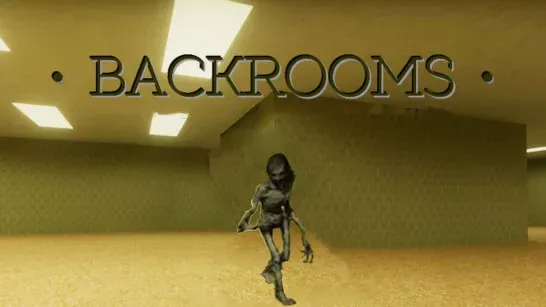























Backrooms turns navigation into the main survival mechanic. The rooms look almost identical, the lights flicker, and the safest route comes from noticing details other players would walk past.
What is Backrooms?
Backrooms is a first-person horror exploration game inspired by the internet creepypasta about endless yellow rooms. You fall out of reality and become trapped in a maze of empty corridors and lost rooms.
There is no combat loop to carry you through the map. Atmosphere, sound design, strange objects, notes, and small environmental changes drive the tension. A corridor that looks unchanged may be the clue that tells you where to look next.
How to Play Backrooms
Move through the maze with WASD, look around with the mouse, and interact with objects using E. Run with Shift when you need to reposition, but do not turn every uncertain moment into a sprint. Similar rooms are easier to compare when you stay calm and observe.
Level 0 is the classic yellow Backrooms area with damp carpet and fluorescent buzzing. Level 1 introduces machinery, fog, standing water, and darker lighting. Level 2 adds industrial tunnels, hot steam vents, and narrower corridors, so route awareness matters more as the level changes.
How to Navigate Backrooms
Treat each hallway as a decision point. Check for notes, objects, light changes, and sounds before committing to a direction. If two rooms look the same, use the smallest environmental difference to keep your mental route organized.
The watch check can support your navigation routine, while the pause control gives you a clean break when you need to reset your attention. The goal is not to move quickly through every room; it is to keep the maze readable.
Tips and Tricks for Backrooms
Track the small differences
Strange objects, notes, and room changes are more useful than speed when the layout repeats.Let sound guide caution
A distant noise or a change in the fluorescent buzz can signal that the next route needs closer inspection.Keep your route legible
Think before each turn so fear does not turn a familiar corridor into a random loop.Respect the darker levels
Fog, standing water, narrow tunnels, and steam vents make later areas harder to read.
Game Controls
| Action | Controls |
|---|---|
| Move | W / A / S / D |
| Look around | Mouse |
| Run | Shift |
| Jump | Spacebar |
| Interact with objects | E |
| Check your watch | Tab or Watch Key |
| Pause | Esc |
Frequently Asked Questions
What is the main challenge in Backrooms?
Navigation. Repeating rooms, environmental uncertainty, and increasingly dangerous levels make route selection more important than fast movement.
How many levels are described in Backrooms?
The route includes Level 0, Level 1, and Level 2, with machinery, fog, water, tunnels, and steam vents appearing as the setting becomes more dangerous.
Are there classic jump scares?
The description emphasizes quiet atmosphere, sound, mystery, and the feeling of being watched rather than classic jump scares.
Backrooms rewards attention over panic. Read the environment, keep your turns deliberate, and use every sound or object as route information.