
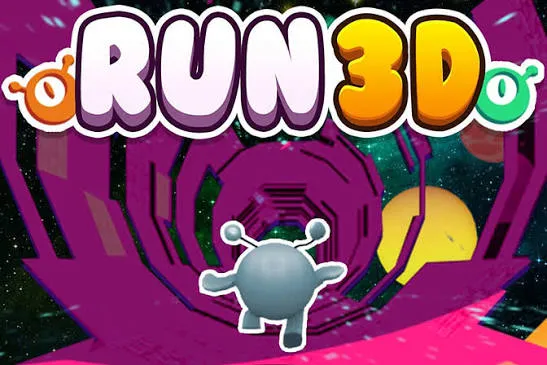



















Run 3D throws you into a cosmic endless runner where you dash through twisting, rotating space tunnels at breakneck speed. Your goal is simple: survive as long as possible without falling into the void.
What is Run 3D?
Run 3D is an endless platform runner set in outer space with 3D visuals. You control a fast-moving character running automatically through a tunnel full of gaps, weak blocks, and sharp turns. The game offers two modes: Infinity mode (endless distance) and Explore mode (fixed levels). Quick reflexes and precise rotation around the obstacle-filled walls are key to success.
For a pure run challenge, Run 3D strips away distractions and dares you to go the distance.
How to Play Run 3D
Game Modes
- Infinity Mode - No finish line. Run as far as you can while the speed gradually increases. Every fall resets your distance.
- Explore Mode - Progress through a series of fixed levels with increasing difficulty. If you fall, you restart that level. The terrain and hazards are the same each attempt, so you can learn and adapt.
Controls and Movement
Your character runs automatically. Use the arrow keys (or A/D) to move left, right, and rotate 360 degrees around the tunnel walls. Jump over gaps with Up arrow, W, or Space. Rotating lets you use any surface as a path - plan your moves to avoid sudden chasms.
Tips and Tricks for Run 3D
- Rotate early - When you see a wide gap, pre-rotate to the wall or ceiling so you land on solid ground.
- Adapt to speed - The game gets faster the farther you go. Keep your turns tight and your reactions snappy.
- Learn from falls - There are no game-overs, just retries. Each fall teaches you the tunnel layout or your timing mistake.
Game Controls
| Action | Controls |
|---|---|
| Move left/right / Rotate tunnel | Arrow Keys (Left/Right) or A/D |
| Jump | Up Arrow, W, or Spacebar |
Frequently Asked Questions
What is the objective of Run 3D?
In Infinity mode, run as far as possible before falling. In Explore mode, complete each level by reaching the end without falling.
How do I unlock new levels in Explore mode?
Complete each level to unlock the next. Coins earned during runs can also be used to unlock new characters or upgrades - the scraped source mentions earning coins, though further details are sparse.
Can I play Run 3D on mobile?
The controls rely on keyboard keys (arrow keys and spacebar). No touch controls are documented, so it’s best played on a desktop or laptop browser.
What happens when I fall?
You restart the current level (Explore mode) or your entire run (Infinity mode). Each fall is a learning opportunity - no permanent penalty.