
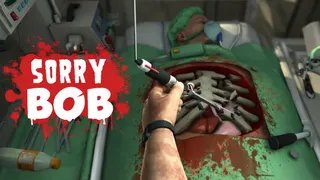























Sorry Bob turns surgery into a physics-based comedy of errors. You play as Nigel Burke, an unqualified “surgeon” with one floating hand and a patient named Bob who really needs a new organ. The controls are deliberately clumsy: you operate each finger separately. The game punishes steady hands and rewards chaotic precision. It’s hard, it’s funny, and it’s available to play online in your browser.
What is Sorry Bob?
Sorry Bob is a 3D dark-humor physics-based surgery simulator where you control a single hand using individual finger keys. The goal: replace a failing organ before Bob bleeds out. But the controls are designed to feel unnatural. Each finger (A, W, E, R, Space) controls a different digit. Mouse movement positions the hand. Left click lowers it. Right click rotates the wrist. Simple actions like grabbing a scalpel become mini puzzles.
How to Play Sorry Bob
The game throws you into first-person surgery with a floating hand. Each level gives a clear objective: replace a damaged organ. Time ticks down, blood drains, and you have to:
- Read the objective and find the correct replacement organ
- Break open the chest with heavy tools (saw, hammer)
- Remove damaged organs without causing too much bleeding
- Insert the correct replacement before blood loss hits zero
Sounds simple, but the controls make it chaos. Your hand moves with the mouse, but gripping tools requires pressing the correct finger key. Too tight and you slip. Too fast and you cause extra damage. Keep syringes nearby to slow bleeding. Clear removed organs to regain visibility.
Tips and Tricks for Sorry Bob
Master finger coordination first
Spend the first few levels just picking up tools and putting them down. Get comfortable with which key closes which finger.Keep syringes in quick reach
Bleeding is your main time limit. Use syringes to slow blood loss while you work.Clear out removed organs immediately
Cluttered operating field blocks your view and makes tools harder to grab. Toss debris aside.Don’t overcorrect
The physics are bouncy. If you miss a grab, don’t panic-grab again. Pause, reposition, then try.Understand the objective before starting
Each surgery tells you which organ to replace. Read it carefully so you don’t grab the wrong replacement.
Game Controls
| Action | Controls |
|---|---|
| Move hand | Mouse move |
| Lower hand to grab | Left click |
| Rotate wrist | Right click (hold) |
| Pinky finger | A |
| Ring finger | W |
| Middle finger | E |
| Index finger | R |
| Thumb | Space |
Key Features of Sorry Bob
Finger-Based Control System
Instead of a generic grab button, each finger is individually mapped. This makes even simple tasks feel difficult, which is exactly the point. It’s a deliberate skill barrier that amplifies the comedy.
Absurd Physics and Dark Humor
Tools slip, organs bounce, and Bob’s suffering is played for laughs. The game is a 3D physics sandbox with a medical theme, closer to Surgeon Simulator than any serious medical training.
Progressive Difficulty
Early operations are simple organ swaps. Later levels introduce more complex procedures, tighter time limits, and more cluttered environments. Each success unlocks new challenges.
Frequently Asked Questions About Sorry Bob
How do I control the hand in Sorry Bob?
Move the mouse to position the hand. Left click lowers it to grab. Right click (hold) rotates the wrist. Use A, W, E, R, and Space to control individual fingers.
Is Sorry Bob available unblocked?
Yes, you can play Sorry Bob online directly in your browser on platforms like Zapgames and AZGames. It should work on most school or work networks.
What happens if Bob bleeds too much?
If blood loss reaches zero, the surgery fails and you have to restart the level. Use syringes to reduce bleeding and work carefully to minimize damage.
Can I play Sorry Bob on mobile?
The game is designed for desktop with keyboard and mouse controls. Mobile controls are not supported.