
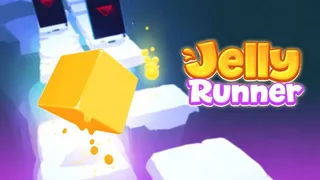





















Tap to jump, and don’t stop. Jelly Runner is a casual endless runner where you guide a soft, squishy jelly block across floating platforms. One mistimed jump and your jelly drops into the void. The goal is simple: run as far as possible, collect droplets, and unlock new jelly characters.
What is Jelly Runner?
Jelly Runner is a casual endless runner game where you control a small jelly character jumping across platforms in a stylized, icy-blue environment. The Casual gameplay focuses on timing and quick reactions as the pace increases. You run, jump over gaps, dodge moving obstacles, and collect droplets to unlock new jelly colors and skins. It’s a quick-play browser game that respects your time and rewards focus.
The game keeps things refreshingly simple: click or tap to jump. There are no complex menus or upgrade trees. The challenge comes from mastering the rhythm as platforms split, disappear, and move. With a bright, stress-free aesthetic, Jelly Runner is the kind of Endless game that pulls you into a “just one more run” loop. It’s also tagged as an Obstacle game because hazards appear quickly and require split-second decisions. The Run tag fits the constant forward motion and high-score chase.
How to Play Jelly Runner
The game starts automatically. Your jelly cube moves forward, and you only need to control its jumps and occasional left or right steering to land safely.
- Tap or click to make the jelly jump.
- Use arrow keys to move left or right on platforms when needed (some versions include side-steering to avoid monoliths and falling platforms).
- Collect droplets scattered on platforms to earn points and unlock new jelly characters.
- Avoid gaps, falling platforms, and moving obstacles. One touch ends the run.
The farther you go, the faster the platforms appear and the more unpredictable the obstacles become. Your score climbs with distance, and a “New High Score” alert flashes when you beat your personal best.
How to Get a High Score in Jelly Runner
- Focus on landing spots, not your jelly. Staring at your character makes you react late. Look ahead to see where you need to land next.
- Develop a steady tapping rhythm. Tapping too fast or too slow leads to falls. Practice a consistent beat that matches the platform spacing.
- Commit when platforms split. Hesitation is the biggest cause of failure. Pick a side early and jump.
- Watch for visual cues. Color changes or platform shakes often signal harder sections ahead.
Tips and Tricks for Jelly Runner
- Landing Zones First Keep your eyes on the next platform, not your jelly. Your brain will handle the timing.
- Steady Rhythm Tap at a consistent pace instead of reacting late. A smooth rhythm beats panic taps.
- Commit Early When platforms split, choose a side immediately. Hesitation costs the run.
Game Controls
| Action | Controls |
|---|---|
| Jump | Click / Tap / Spacebar |
| Move Left | Left Arrow |
| Move Right | Right Arrow |
Key Features of Jelly Runner
Colorful Jelly Characters
Unlock a variety of jellies and paint them in vibrant, shiny colors. Each jelly looks unique, and customizing adds a personal touch to every run.
Simple but Addictive Gameplay
One-tap controls make the game easy to learn, while increasing speed and obstacles keep it engaging over time. Perfect for short play sessions.
Dynamic Platform Design
Floating platforms, gaps, and hazards require constant attention and precise timing. No two runs feel exactly the same.
Endless Replay Value
Each run offers a fresh layout of platforms and obstacles. The urge to beat your high score keeps you coming back.
Frequently Asked Questions
Is Jelly Runner unblocked?
Yes, you can play Jelly Runner directly in your browser without downloading anything. It runs on platforms like Zapgames and Azgames, which are often unblocked at school or work.
How do I unlock new jelly characters?
Collect droplets during your runs. Droplets appear on platforms and add to your total. Once you have enough, you can unlock new jelly skins and colors from the menu.
Can I play Jelly Runner on mobile?
Yes, the game works on mobile browsers. Tap the screen to jump, and swipe or use on-screen buttons if movement controls appear.
What happens when I fall?
The run ends immediately, and your final score is recorded. You can restart instantly to try again and improve your distance.