
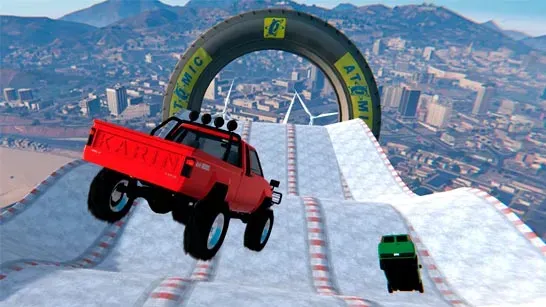


























Ice Drop: GTA 5 puts you behind the wheel on floating ice tracks suspended above snow-covered mountains. Your goal is to reach the finish while steering across narrow paths, ramps, gaps, and elevated hazards without falling.
How to Play Ice Drop: GTA 5
Ice gives your car very little grip, so speed control matters more than keeping the accelerator down. Slow before corners and ramps, then line up the car carefully before each jump. Carry too much speed into a turn and the car can slide beyond the track; hit a ramp at the wrong angle and you may overshoot the landing area.
The courses include narrow ice sections, wide mid-air gaps, elevated red mesh tunnels, and checkered spheres near jump lines. When the car leaves a ramp, use the controls to pitch and roll it in the air. A level landing on all four wheels helps prevent bouncing off a narrow platform.
If the car flips or falls, press F to restore it to the track. The quick reset lets you resume from the course instead of restarting the run from the beginning.
Tips for Ice Drop: GTA 5
- Brake before the corner: Start slowing well before a turn because the car takes longer to stop on ice.
- Approach ramps under control: Excessive speed can send the car past the landing deck.
- Tap the handbrake: Use Space for brief corrections or quick drifts. Holding it too long can spin the car out.
- Trim your landing in mid-air: Use WASD or the arrow keys to level the car before it touches down.
- Reset immediately after a fall: Press F as soon as the car leaves the course or flips over.
Game Controls
WASD or the arrow keys accelerate, reverse, and steer on the track. The same controls pitch and roll the car while it is airborne. Space activates the handbrake, F restores the car after a fall or crash, C changes the camera, and Tab opens the pause menu.