
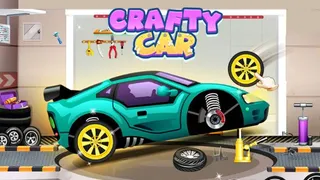




























Crafty Car turns your browser into a quiet workshop where cars come together one part at a time. No timers, no pressure, just you, your mouse, and a growing pile of bumpers, frames, and headlights waiting for their spot.
What is Crafty Car?
Crafty Car is a hands-on casual simulation game where you build cars from scratch or repair damaged vehicles. You choose between Assembling Mode and Repairing Mode, each offering a different kind of tinkering. The game uses simple drag-and-drop controls and builds from small city cars to sporty custom jobs. It’s a relaxing workshop experience for anyone who enjoys seeing a car slowly take shape, making it a perfect fit for fans of simulation and chill browser games.
The appeal is in the details — every piece snaps into a highlighted spot, and each completed job earns coins that unlock tougher projects. The game doesn’t rush you, but each new level brings more complex tasks, like engine assembly and interior fitting. Whether you have three minutes or thirty, Crafty Car keeps the pace your own. It’s a car game that respects your patience.
How to Play Crafty Car
The game starts by picking a mode. Both use the same point-and-click controls, but the workflow changes.
Assembling Mode
You start with a bare metal frame and follow a visual guide. Each part — bumper, side panels, headlights, doors — must be dragged to its highlighted spot. Once every piece is in place, the car is complete and you earn coins.
- Start with the frame and undercarriage.
- Work outward: engine and chassis first, then exterior panels, then doors and paint.
- Each assembly unlocks new parts and more complex builds.
Repairing Mode
This mode simulates a real workshop. A damaged car rolls in, and you fix it step by step.
- Lift the car with a jack.
- Remove damaged tires by unscrewing them.
- Choose the correct replacement parts and tools.
- Mount new wheels, tighten everything, and inflate tires to the right pressure.
- Once done, you earn coins and reputation to upgrade your tools and workshop.
Both modes require precision but never punish mistakes — you can always try again.
Tips and Tricks for Crafty Car
- Build from the inside out
Always place the engine and frame before doors, bumpers, and paint. The game highlights the correct order, but following this rule saves time. - Watch the part outlines
Each spot has a faint guide shape. Use it to see exactly where a piece belongs before dropping it. - Save your coins for later levels
Early jobs are simple. Hold onto your earnings for when the game asks for advanced repairs or rare parts. - Enjoy the process
Half the fun is watching the car come together. Don’t rush — this game rewards steady hands, not speed.
Game Controls
| Action | Controls |
|---|---|
| Select parts and components | Left Mouse Click |
| Drag parts into place | Click + Drag |
Key Features of Crafty Car
Two Distinct Modes
Assembling Mode treats you like a factory line, while Repairing Mode puts you at the service bay. Both teach different skills and keep the experience fresh.
Satisfying Progression
Every completed job earns coins that unlock new tools, more complex vehicles, and bigger projects. The difficulty ramps up naturally, so you always feel ready for the next challenge.
Bright, Clean Visuals
The art style is colorful and easy to read. Parts are clearly labeled, and the interface stays out of your way.
Frequently Asked Questions About Crafty Car
Can I play Crafty Car for free?
Yes, Crafty Car is free to play in your browser. No downloads or accounts required.
Is Crafty Car unblocked?
The game runs directly in the browser and is accessible on most networks. If your school or office blocks gaming sites, look for unblocked mirrors.
What are the modes in Crafty Car?
The game has two modes: Assembling Mode (building cars from parts) and Repairing Mode (fixing damaged vehicles). You choose at the start of each session.