
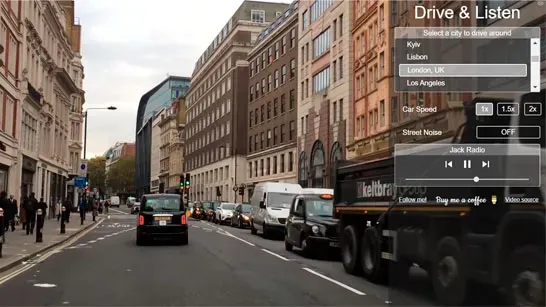



























Drive & Listen turns city exploration into a calm virtual road trip. Choose a destination, select its local radio station, and watch real-world streets through dash-cam footage while the ride plays automatically.
What is Drive & Listen?
Drive & Listen is a driving simulation focused on atmosphere rather than racing, missions, or obstacle avoidance. It features over 100 cities, from Tokyo and Paris to New York City and Istanbul, with each location offering its own streets and soundscape.
There is no steering challenge or finish line to chase. Your main choice is where to ride and which local station fits the route. The automatic drive lets you focus on the city footage, radio, and ambient sounds.
How to Play Drive & Listen
Start by choosing a city from the world map. Select a local radio station from the sidebar, then adjust the playback speed or ambient sound settings. Press play and let the route continue, or pause whenever you want to stop on a view or change your setup.
The ride does not require obstacle avoidance, so there are no documented crashes or other failure conditions. The practical decisions are about the destination, station, speed, and sound balance. Pick a city you want to revisit, preview a possible travel destination, or use the footage and foreign-language radio as a relaxed background companion.
Game Controls
- Choose a city or radio station: Click with the mouse.
- Adjust playback speed: Drag or click with the mouse.
- Pause or resume the ride: Press Space or click Pause.